

LVMON lets you put MON-related exposure to work on LeverUp. Once you hold eligible LVMON, you can choose to stake it for variable rewards or use it as supported collateral for trades.
What This Guide Covers
- What LVMON is and how you get it
- How to stake LVMON and start earning yield
- How to view your rewards
- How to unstake and redeem back to MON
- How to use LVMON as trading collateral
Before You Start
- You hold MON in your wallet on Monad mainnet
- You've read How to Use AnyCollateral if you plan to trade with LVMON as collateral
What Is LVMON
LVMON is LeverUp's MON ecosystem synthetic token. All MON-collateral positions on LeverUp are denominated and settled in LVMON. In the interface, the Mint flow provides access to opening a position with MON as collateral that settles in LVMON.
Once you hold eligible LVMON, you can choose to:
- Stake LVMON — participate in variable rewards generated through Monad's yield-bearing infrastructure
- Use LVMON as collateral — open leveraged positions with LVMON as a supported collateral type, subject to current protocol parameters
For the full explanation of how LVMON fits into LeverUp's design, see LVMON Staking Is Live.
Where to Find the LVMON Interface
Go to app.leverup.xyz and navigate to the LVMON page. You'll see two tabs at the top:
- LVMON Stake — stake, unstake, and view your rewards
- Mint & Redeem — access the MON-collateral flow that settles in LVMON, or redeem eligible LVMON back to MON
Step 1: Get LVMON
LVMON enters your wallet when you open and close a position using MON as collateral. When you close a MON-collateral position, the protocol settles it in LVMON — that's the LVMON you then stake.
To open a MON-collateral position:
- Navigate to the LVMON page and select the Mint & Redeem tab
- Under the Mint sub-tab, click Open Position — this takes you to the trading interface
- Open a position with MON as collateral, then close it to receive LVMON as settlement

Once you have LVMON in your wallet, it doesn't earn yield until you stake it.
Step 2: Stake LVMON
- Select the LVMON Stake tab
- Under the Stake sub-tab, enter the amount of LVMON in the Pay Total field
- Click Approve to authorize the contract, then confirm the stake transaction

Once staked, your position appears under My Position with three fields:
- Total Staked — your active staked balance
- Current Rewards — rewards accrued since the last distribution
- Cumulative Rewards — total LVMON earned across all distributions
How Rewards Work
Staking yield comes from Monad POS Rewards — the protocol deploys the vault's MON through Monad's yield-bearing infrastructure and routes the resulting rewards back to eligible LVMON stakers.
Rewards are distributed in LVMON on a regular schedule (approximately every 6 hours, as displayed in the Staking Interest panel). The distribution amount and timing are shown in the Staking Interest panel at the bottom of the page:
- Last distribution — amount and time of the most recent payout
- Next distribution time — when the next payout is scheduled
- Realtime amount — rewards currently accruing
- Estimated full-cycle amount — projected reward for the current distribution cycle

Note on yield rate: The APY shown is a 1-day average. Only staked LVMON participates in yield distribution, so effective yield may vary with participation levels, underlying rewards, vault activity, and current protocol settings. Staking yield is variable and not guaranteed.
How to Unstake
- On the LVMON Stake tab, select the Unstake sub-tab
- Enter the amount of LVMON to unstake
- Confirm the transaction — LVMON returns to your wallet
How to Redeem LVMON Back to MON
After unstaking, you can convert LVMON back to MON:
- Select the Mint & Redeem tab
- Choose Redeem or Fast Redeem
- Enter the LVMON amount and confirm

Redemption options:
- The interface may provide different redemption options for converting eligible LVMON back to MON.
- Review the output amount, processing time, limits, and any applicable fees shown in the interface before confirming.
Using LVMON as Collateral When Trading
LVMON is a supported collateral type for perpetuals positions. If you choose to use LVMON as collateral, the applicable collateral ratio determines how it contributes to available margin.
When opening a trade:
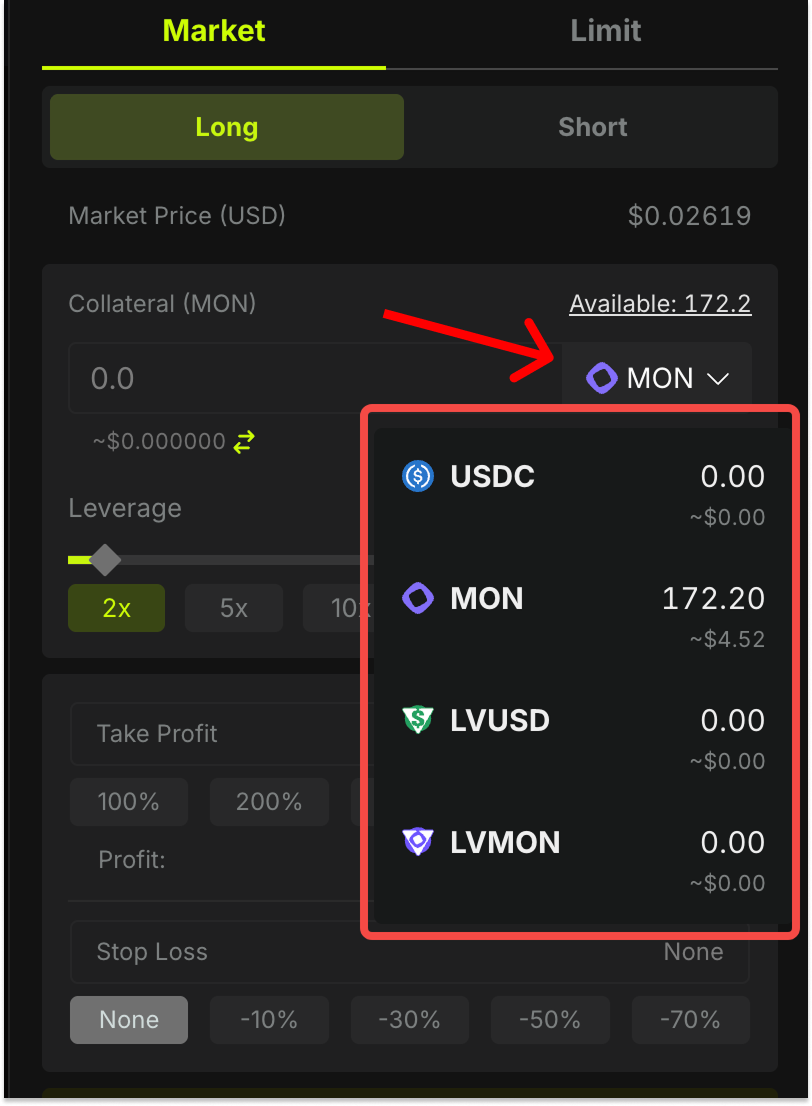
- In the order panel, open the collateral selector
- Choose LVMON from the dropdown
- The panel applies LVMON's Collateral Ratio (CR) to calculate your available margin
Example: If LVMON has a CR of 70% and you use 100 LVMON as collateral, your available margin is equivalent to 70 LVMON.
For a full explanation of Collateral Ratio, see How to Use AnyCollateral.
Things to Be Aware Of
LVMON tracks MON's price. If MON falls in value, your LVMON collateral is worth less — tightening your liquidation price even if your traded market hasn't moved against you. Monitor your margin ratio in the position panel if using LVMON as collateral.
Using LVMON as collateral for a Long MON position = double exposure. Your collateral and your position both track MON. A drop in MON hits you from both sides simultaneously.
Collateral Ratio is set by the protocol and may change. Always check the current CR shown in the order panel when opening a trade.
Staking yield is not fixed. APY shown is a 1-day average and changes as vault activity, Monad POS reward rates, and the staked fraction of LVMON all fluctuate.
What to Read Next
- LVMON Staking Is Live — Full explanation of the yield mechanism, participation rate amplifier, and $LV buyback connection
- How to Use AnyCollateral — How Collateral Ratio works across all supported collateral types
- How Liquidation Works on LeverUp — Especially relevant if you plan to trade with LVMON as collateral